The tool most of us touch all day
If you work at a computer, the mouse is probably the device you use more than any other. A normal day is made of hundreds of small moves: opening menus, switching windows, scrolling through long documents, nudging sliders, jumping between apps.
None of that is dramatic, and a mouse will not change how much work you have. But small frictions add up over long sessions, especially if you move between several programs. That is the space Logitech's MX Master line is designed for: a full-size wireless mouse with extra controls and software customization for people who spend many hours on a computer.
What the MX Master 4 is
The MX Master 4 is a wireless mouse made by Logitech, which describes it as its most advanced wireless mouse. On Logitech's US store it costs $119.99 and comes in Graphite, Pale Gray and Black.
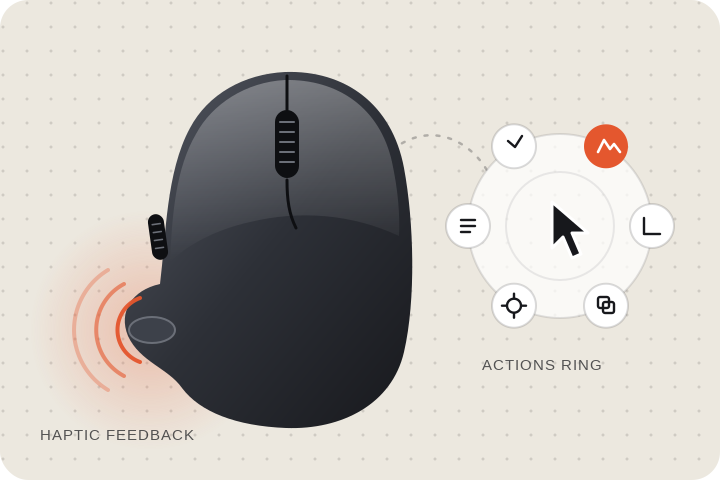
Two features define this model. The first is the Haptic Sense Panel, an area under your thumb that can give short, customizable vibrations when certain actions happen. The second is the Actions Ring, a ring of shortcuts that opens on screen right where your cursor is. Both are set up in Logitech's Logi Options+ app, which runs on recent versions of Windows and macOS.
Around those features you find what the MX Master series is known for: a MagSpeed scroll wheel, a thumb wheel for horizontal scrolling, a gesture button, a high-precision sensor and a rechargeable battery.
Features, in plain language
Everything below comes from Logitech's product page and specifications. We did not run our own tests.
-
Haptic feedback you can tune
The Haptic Sense Panel can pulse for things like an image snapping to a grid, switching desktops, adjusting a slider or a notification. You choose where it is used and how strong it feels in Logi Options+. Logitech lists support for Actions Ring, Smart Actions and gestures, plus plugins for Adobe Photoshop, Adobe Lightroom Desktop and Zoom.
-
Shortcuts at the cursor
The Actions Ring brings your chosen tools, shortcuts and actions to the cursor, so you spend less time hunting through menus. You can personalize it and add plugins for third-party apps in Logi Options+.
-
MagSpeed wheel and thumb wheel
The MagSpeed wheel with SmartShift is built for fast scrolling through long documents, and a separate thumb wheel handles horizontal scrolling, useful in spreadsheets and timelines.
-
Eight buttons, including a gesture button
The mouse has 8 buttons in total. Buttons and gestures can be reassigned in Logi Options+.
-
Tracking on almost any surface
A Darkfield high-precision sensor, adjustable from 200 to 8,000 DPI in steps of 50. Logitech says it tracks on any surface, including glass.
-
Two ways to connect
Bluetooth Low Energy (5.1) or the Logi Bolt USB-C receiver included in the box, with a wireless range of up to 10 m (33 ft). Logitech notes it is compatible with both USB-C and USB-A Logi Bolt receivers.
-
Rechargeable battery
A 650 mAh rechargeable battery, with a battery life listed by Logitech at 70 days. Actual results depend on how you use it.
-
Materials, as stated by Logitech
In the Graphite version, the plastic parts include 54% certified post-consumer recycled material (excluding the receiver, printed wiring assembly, cable and packaging). The thumb wheel aluminum is made with renewable energy, and the battery uses 100% recycled cobalt, measured by mass balance.
Who will probably get the most out of it
A good match if you
- Spend most of the day on a Windows or Mac computer and move between many apps.
- Work in apps Logitech lists for haptic plugins, such as Adobe Photoshop, Adobe Lightroom Desktop or Zoom.
- Like assigning your own shortcuts and gestures to the buttons.
- Want the option of Bluetooth or a USB receiver.
Maybe not the best fit if you
- Mainly use Linux, ChromeOS, iPadOS or Android: basic functions work, but Logitech says the advanced features need recent Windows or macOS.
- Prefer a small or very light mouse: it measures 128 × 88 × 51 mm and weighs 150 g.
- Are looking for the lowest price: simpler mice cost much less.
A mouse is a work tool, not a health product
- Pain or discomfort: if you have persistent pain, numbness or tingling in your hand, wrist, arm or shoulder, talk to a doctor or a physical therapist. Changing equipment is not a substitute for care, and no mouse treats or prevents any condition.
- Work computers: if your computer is managed by your employer, ask your IT team before installing Logi Options+ or plugging in a USB receiver.
- Setup and warranty: for pairing, software or warranty questions, use Logitech's support pages for the product, which include documentation, downloads and a warranty claim form.
What to know before buying
- Features depend on your system. Haptic feedback, Actions Ring, Smart Actions and Flow work only with Logi Options+ on recent versions of Windows and macOS. On other systems the mouse works with its basic functions.
- Logitech's own figures. Logitech says the Actions Ring can save up to 33% of your time and cut mouse movements by up to 63%, based on its own 2025 Ergo Lab study with 37 MX Master users across 8 desktop actions. These are the manufacturer's numbers; results vary with the shortcuts you set up. We did not test them.
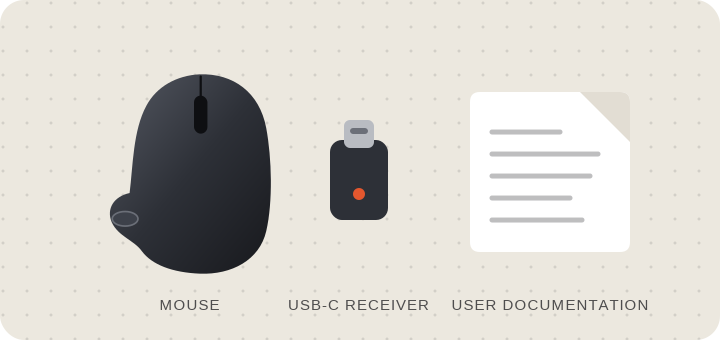
- What's in the box. Logitech lists the mouse, a USB-C Logi Bolt receiver and user documentation.
- Prices change. Price, stock and promotions on Logitech.com can change at any time. Always confirm them on the store before you order.
What happens when you click
- You leave this website and go to the MX Master 4 page on Logitech's official US store (logitech.com).
- You choose the color (Graphite, Pale Gray or Black) and add the mouse to your cart.
- You check out on Logitech's own checkout, which shows the available payment methods; when we checked, they included PayPal, Amazon Pay and Google Pay. For orders placed from outside the US, Logitech's cart showed Global-e as the merchant of record.
- Shipping, returns and warranty follow Logitech's policies. The product page listed free shipping (3–5 business days) on all orders and free returns within 30 days of purchase, plus a 1-year limited hardware warranty.
The essentials in one place
Logitech MX Master 4
| Product | MX Master 4 wireless mouse (Graphite, part 910-007558; also Pale Gray and Black) |
|---|---|
| Made by | Logitech |
| Format | Physical product, sold and shipped by Logitech's official store |
| Price | $119.99 on Logitech.com (US), checked in October 2026 |
| Shipping | Free shipping (3–5 business days) on all orders, per the product page |
| Returns | Free returns within 30 days of purchase, per the product page |
| Warranty | 1-year limited hardware warranty |
You will be redirected to logitech.com, Logitech's official store. This website does not sell the product, handle payments or ship orders.
Frequently asked questions
Does the MX Master 4 work with a Mac?
Yes. Logitech lists macOS 13 or later, both over Bluetooth and with the Logi Bolt receiver. Customization is done in Logi Options+. Logitech also sells a separate MX Master 4 for Mac.
Do I have to install software?
Not for the basics. To customize buttons and to use haptic feedback, Actions Ring, Smart Actions and Flow, you need Logi Options+ on a recent version of Windows or macOS.
Is a receiver included?
Yes, a USB-C Logi Bolt receiver. You can also connect over Bluetooth Low Energy.
How long does the battery last?
Logitech lists a 650 mAh rechargeable battery with a battery life of 70 days. How long it lasts for you depends on your use.
Does it work on glass?
According to Logitech, the sensor tracks on any surface, including glass.
Which systems are supported?
Over Bluetooth: Windows 11 or later, macOS 13 or later, Linux, ChromeOS, iPadOS 15 or later and Android 12 or later. With the Logi Bolt receiver: Windows 10 or later, macOS 13 or later, Linux and ChromeOS. Advanced features need Windows or macOS.
Who sells and ships it?
Logitech's official store. This website only links to it and has no part in the sale, payment, delivery or returns.
Where do I get help with the product?
On Logitech's support pages for the MX Master 4, which include setup guides, downloads, FAQs and warranty claims.
About this page
This is advertising content (an advertorial) published by ELISEU DIGITAL DROPSHIPPING LTDA, an independent company. We are not Logitech, we are not an official Logitech store and this page is not endorsed by Logitech.
Product information comes from Logitech's official product page as checked in October 2026 and may change. We did not receive the product from Logitech and did not run our own tests. Purchases, payments, shipping, returns and warranty are handled by Logitech under its own terms.
Logitech and the Logitech product names mentioned on this page are trademarks of Logitech.
Want to see photos, colors and the current price? Logitech's product page has all of it.
Go to the MX Master 4 on Logitech.comYou will leave this website and go to Logitech's official store.